
Log Extender
After 30 days, the evidence is gone
Audits and disputes
A partner says an order never arrived in March. The message log that settles it was deleted weeks ago.
Slow-burning bugs
A mapping error shows up once a month. By the time someone notices the pattern, only the latest case is left to look at.
Questions from the business
"Did we send invoice 4711?" The answer is inside an attachment, and Cloud Integration cannot search attachments at all.
How it works
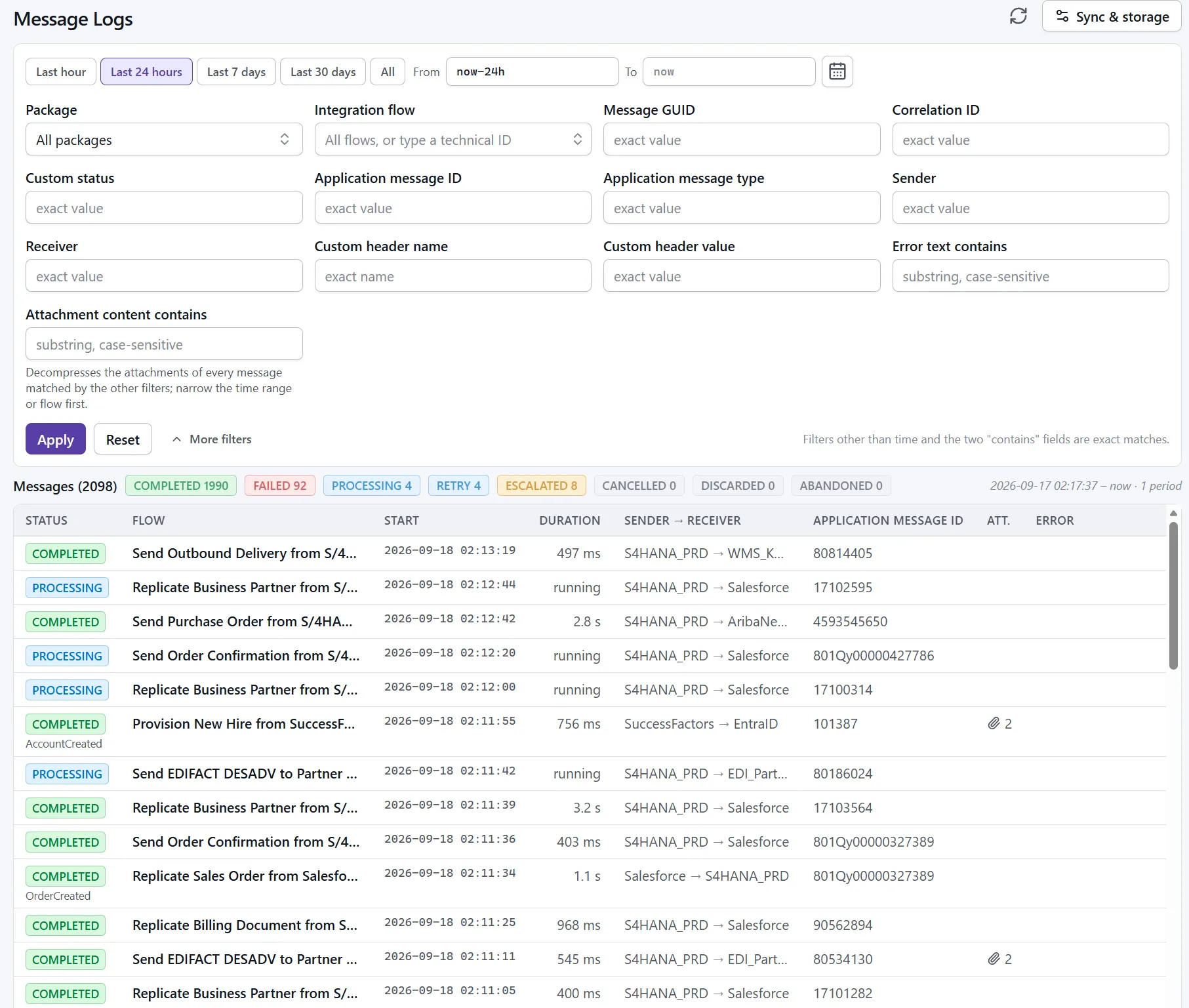
Companion polls each tenant for new message logs and stores them with their attachments, headers and error details. Your team opens Companion in the browser and searches months or years of messages with the filters they know from the Cloud Integration monitor.
What you get
Search the whole archive
Filter by time range, status, flow, package, message ID, correlation ID and custom headers, across every month you have kept.
Find text inside attachments
Search the content of stored attachments for an order number or a partner ID. Cloud Integration itself cannot do this.
Attachments and error details kept
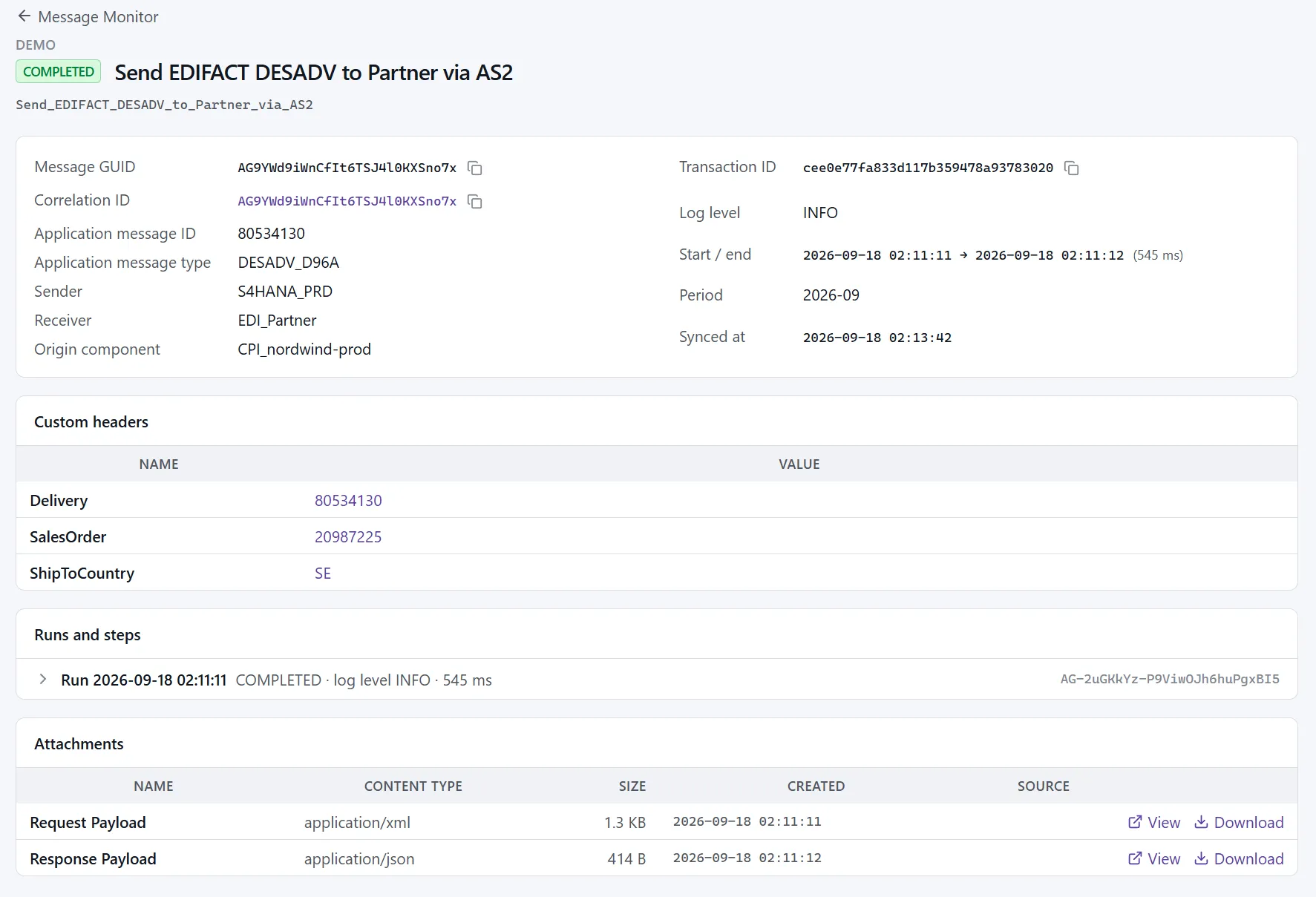
Attachments, custom headers and error text are stored next to each message, so an old message opens with everything it had.
All your tenants in one place
Connect development, test and production tenants to one Companion and switch between them.
Retention you control
Choose how many months stay online. Older months can move to an archive directory and be restored with one click.
Runs like a server should
User accounts with admin and user roles, HTTPS with your own certificate, a health check, and a sync that pauses instead of deleting when the disk runs full.
Open an old message as if it were from today
The detail view shows status, flow, IDs, custom headers, the error text and every attachment. Click a correlation ID or a header value to find the related messages.
One container, one volume
There is no database server to run and no cluster to operate. Everything lives in one data directory. To upgrade, pull the new image and start it on the same volume. To back up, copy the directory.
docker volume create pizug_companiondocker run -d --name pizug-companion -p 3000:8080 \ -v pizug_companion:/data --restart=always pizug/companion:2.0.1Your data stays with you
Self-hosted
Companion runs in your network or your cloud account. Message logs and attachments never pass through our servers.
Offline license
The license key is checked locally. Companion does not need to reach us to start or to keep working.
Credentials encrypted
Tenant credentials are stored encrypted with AES-256-GCM, with a key that you hold and back up.
Sized for real tenants
A tenant with up to three million messages a month runs on 2 vCPUs and 8 GB of memory.
Your archive stays readable
An archive is only useful if it still opens years from now. We treat the storage format as a long-term contract: every future version of Companion reads what today's version writes. Closed months are sealed and integrity-checked. And your archive does not depend on us: it is built on open, widely used technology, and on request we give customers the tools to read their data without Companion.
Releases come with a public changelog.
Free tools, licensed archive
| Community license | Log Extender license | |
|---|---|---|
| Price | Free | Contact us |
| Developer tools (where-used, flow diff, flow image and more) | Yes | Yes |
| Connect several tenants | Yes | Yes |
| User accounts and HTTPS | Yes | Yes |
| Log sync: messages and attachments collected and stored | Yes | Yes |
| Search and open messages | Last 7 days | Everything stored |
| Attachment content search | Last 7 days | Everything stored |
| Restore archived months | No | Yes |
Questions
Does it change anything in my tenant?
No. Log Extender reads message logs through the Cloud Integration OData API with a service key you create. It deploys nothing to the tenant and needs no change to your flows.
How far back can it go when I first connect a tenant?
As far as the tenant still has logs, so up to 30 days. From then on it keeps what it collects for as long as you configure.
How much disk does it need?
In our tests, about 3.5 GB per million messages with a typical attachment mix. Attachments are compressed. A tenant with very large attachments needs more; the sizing guide in the docs explains how to estimate it.
What happens if the disk fills up?
Nothing is deleted. When free space falls below a threshold you can configure, log sync pauses and the application shows an alert; it continues by itself once there is space, and nothing is missed while the tenant still has the logs. If you prefer, Companion can remove the oldest closed month instead, or move it to the archive directory. That is a setting you switch on.
What happens when the license ends?
Nothing locks on the end date, and collection never stops. There are 30 days of notice before the end and 30 days after it in which everything works as before. After that the installation continues on the free community license: it keeps collecting, keeps everything it has stored, and searches the last 7 days. A renewed key opens the whole archive again.
Where can it run?
Anywhere Docker runs: a Linux server, a VM in your cloud account, or a Windows or Mac machine for evaluation. We recommend Linux for production.
Start keeping your logs today
Every day without an archive is a day of logs that will be gone in a month.